
What This Page Is For
The Privacy & Coverage tab is optional.
Use this page to review how OneLence Connect should behave around consent, how it reads signals from an existing consent platform, and whether OneLence Consent should be used alongside it.
This page does not manage your cookie banner itself. Instead, it helps OneLence Connect decide when tracking and attribution cookies are allowed, based on the consent setup already present on the site.
What This Page Contains
The page is built around three areas:
- Consent setup on this site
- OneLence Consent
- How OneLence Connect should behave
Together, these sections help you understand:
- whether a CMP is already detected
- whether OneLence Consent is installed and active
- how strict or relaxed OneLence Connect should be before analytics consent is available
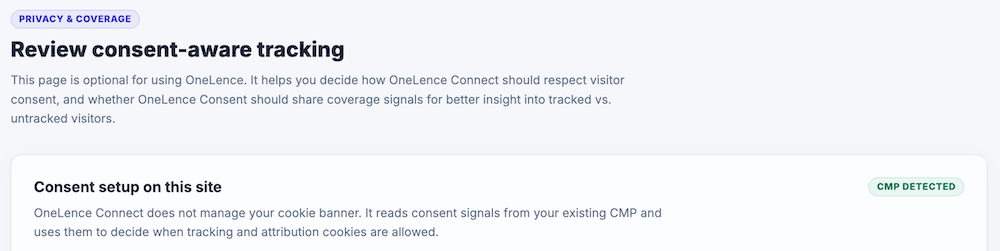
Consent Setup On This Site
This section shows whether OneLence Connect has detected an active CMP on the website.

OneLence Connect does not create or manage the cookie banner. It only reads consent signals from the CMP already running on the site and uses those signals to decide when tracking and attribution cookies are allowed.
If a CMP is detected
If a CMP is found, the page shows:
- CMP detected
- the name of the active CMP
For example, the detected CMP may be:
- OneLence Consent
- Borlabs Cookie
- Complianz
- CookieYes
- GDPR Cookie Consent (Moove)
- Cookiebot
- Iubenda
- TCF / IAB Framework
In this case, OneLence Connect can use the consent signal from that CMP as part of its tracking behavior.
If no CMP is detected
If no CMP is detected, the page shows:
- No CMP detected
- Active CMP: None detected
This means OneLence Connect is not currently receiving consent signals from a recognized consent platform on the site.
You can still use OneLence Connect without OneLence Consent, but if the site needs a consent banner or clearer coverage visibility, this is a good moment to review your consent setup.
OneLence Consent
This section explains the relationship between OneLence Connect and OneLence Consent.
OneLence Consent is a separate plugin for managing:
- the cookie banner
- visitor consent choices
- banner-related settings
You do not need OneLence Consent in order to use OneLence Connect.
However, it can make consent coverage easier to understand in OneLence, especially when you want better visibility into:
- total visitors
- visitors who granted trackable consent
- the difference between tracked and untracked traffic
If OneLence Consent is active
When OneLence Consent is installed and active, this section shows it as Active.
In that case, you can also control:
Forward consent coverage to OneLence
This setting sends lightweight consent status signals from OneLence Consent to OneLence.
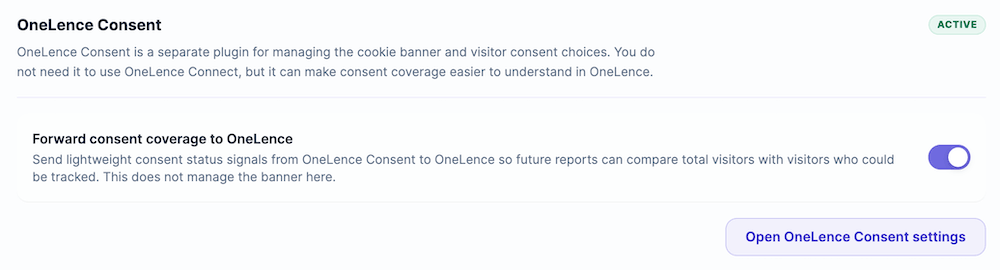
Use this when you want future OneLence reporting to compare:
- total visitors
- visitors who could be tracked based on consent
Important note:
- this does not manage the banner from inside OneLence Connect
- it only forwards coverage-related consent status for reporting purposes
You can also use the Open OneLence Consent settings button to go directly to the OneLence Consent plugin settings.
If OneLence Consent is not active
If OneLence Consent is not installed or not active, this section is shown as optional.
In that case, OneLence Connect still works, but the page presents OneLence Consent as one possible way to make consent handling and coverage easier to understand.
This is the right place to explain it to users in a soft way:
- they can keep using their current CMP
- they do not need to switch if their current setup already works
- but OneLence Consent can be useful when they want a more native OneLence consent setup and future coverage insights
If another CMP is already in use
If a different CMP is already detected, users can continue using it.
OneLence Consent is not required in that case.
However, OneLence Consent may still be a good option for users who want:
- a OneLence-native consent setup
- simpler alignment between consent handling and OneLence
- easier long-term visibility into tracked versus untracked visitor coverage
If no CMP is detected at all
If no CMP is detected, this section becomes an especially relevant recommendation point.
In that situation, OneLence Consent can be presented as one option for adding:
- a consent banner
- visitor consent collection
- clearer future coverage insights in OneLence
Download or install OneLence Consent
If users want to use OneLence Consent, they can either install it from inside OneLence Connect or download it separately.
OneLence Consent is optional, but it can make consent-aware setup and future coverage reporting easier to manage inside the OneLence ecosystem.
How OneLence Connect Should Behave
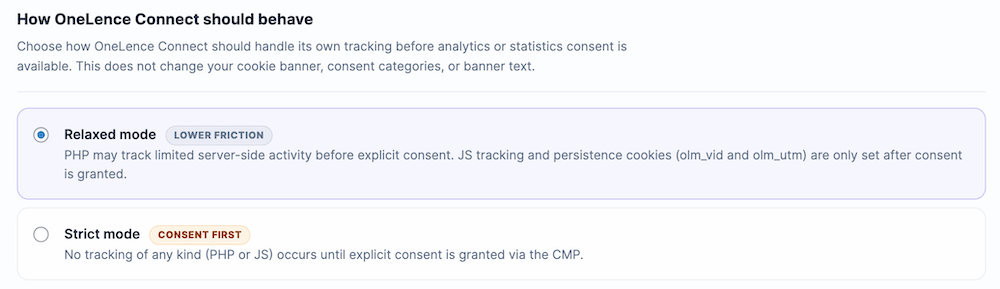
This section controls how OneLence Connect should handle its own tracking before analytics or statistics consent is available.
Important note:
- this does not change your cookie banner
- this does not change consent categories
- this does not change banner text
It only changes how OneLence Connect behaves based on consent availability.
Relaxed mode
This is the lower-friction option.
In this mode:
- PHP may track limited server-side activity before explicit consent
- JavaScript tracking only starts after consent is granted
- persistence cookies such as
olm_vidandolm_utmare only set after consent is granted
Use this when:
- you want a less restrictive setup
- your consent model allows limited server-side activity before explicit consent
- you want lower friction while still respecting post-consent cookie and JS behavior
This is often the easier option operationally, but it depends on your privacy expectations and legal setup.
Strict mode
This is the consent-first option.
In this mode:
- no tracking of any kind happens before explicit consent
- this applies to both PHP and JavaScript tracking
Use this when:
- your site should wait for explicit consent before any tracking begins
- your compliance model requires stricter consent handling
- your legal or privacy setup is intentionally conservative
This mode is the clearer “nothing before consent” approach.
Attribution Cookies Used By OneLence Connect
OneLence Connect uses first-party cookies for attribution persistence, including:
olm_vidolm_utm
These are treated as statistics or analytics cookies in supported CMP flows.
This matters because the consent behavior on this page helps determine when those cookies are allowed to be used.
Recommended Use Of This Page
For most sites, the practical decision flow is:
- check whether a CMP is already detected
- decide whether to keep the current CMP or use OneLence Consent
- choose whether OneLence Connect should behave in Relaxed or Strict mode
- if OneLence Consent is active, decide whether to forward consent coverage to OneLence
When To Use OneLence Consent
A soft recommendation for OneLence Consent makes the most sense when:
- no CMP is currently detected
- the user wants a more native OneLence setup
- the user wants clearer visibility into tracked versus consent-blocked traffic
- the current CMP setup feels fragmented or hard to interpret
In those situations, OneLence Consent is not a requirement, but it can be a helpful upgrade.
Summary
A simple way to explain this page to users is:
- OneLence Connect does not manage the banner
- it reads consent signals from the site’s CMP
- OneLence Consent is optional, but useful
- this page controls how strictly OneLence Connect should wait for consent
- if OneLence Consent is active, coverage signals can also be forwarded to OneLence